Parameter Setup
Parameter Setup
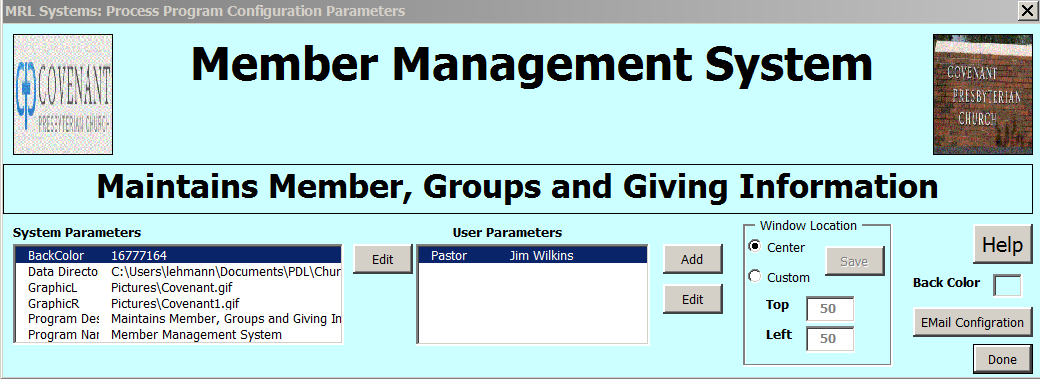
The User (or Designer) has the flexibility to modify the Screen Appearance and location or define parameters for use in reports/E-mail templates. The Screen to do this is shown below.
Main Screen
These inputs allow for customization of the Top portion of most screens. These include the following:
System Parameters
The User may specify names/values for parameters to be user in Reports or Email forms.
The default Window (centered) is set by selecting Center. Alternatively, the designer may locate the forms at any screen position by selecting custom and entering desired location.
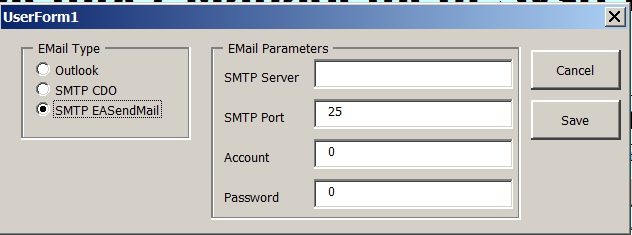
MyChurch supports alternative methods of connecting to an email Server. The default is for Outlook. No Parameters are required for Outlook. The Form Below Allows for Specifying parameters for the alternate connections supported.
Email Configuration Options
The SMTP Server and Port are required. Additionally a user account and password for connecting may be required.